


I had the background color of my AppBar and Scaffold set to the same color, but whenever I would scroll it would change to some default color that I could not set or edit. I saw a couple of posts related to this issue:
https://stackoverflow.com/questions/72379271/flutter-material3-disable-appbar-color-change-on-scroll
https://community.flutterflow.io/ask-the-community/post/app-bar-changing-colour-RxmCP0Gc5dZwI4Q

Scroll-

My solution to this issue was the following:
1) Click the AppBar in the widget tree
2) In the AppBar properties "Background Properties" enable "Add Background Widget" and "Edit in UI Builder"
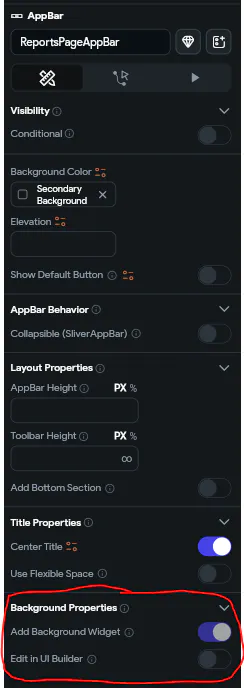
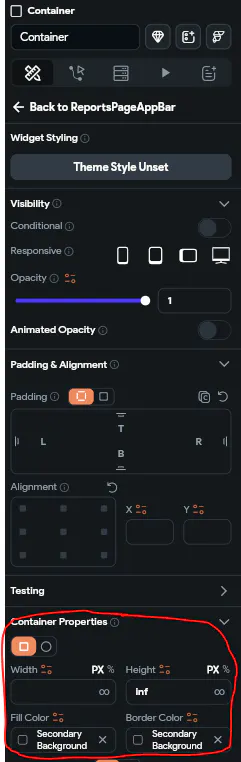
3) Replace "Image" in "AppBar Background" in the widget tree with a container (You will only be able to do this if "Edit in UI Builder" in the previous step is enabled)

4) Set the properties of your newly added container to whatever color you want it to be (I attached a picture of what worked for me below)
Good luck I hope this helps!
Looked on Stack Overflow, Flutter Community, ChatGPT, and in project testing.