


let me get some experience from the seniors for the problem of Dynamic ListView with "Delete" button problem.
I am just a beginner (0-level).
I tested at my project as below:
====
data is as below:
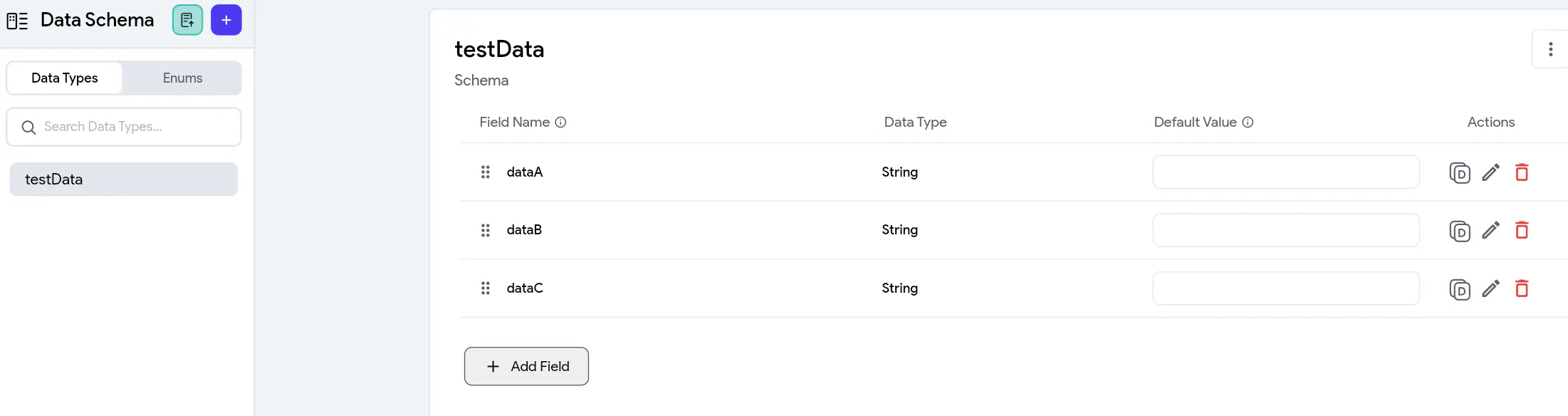
and there is a ListView and inside it, a component named "ListViewRoot"

Inside this component, there are text-fields and one "delete" button.
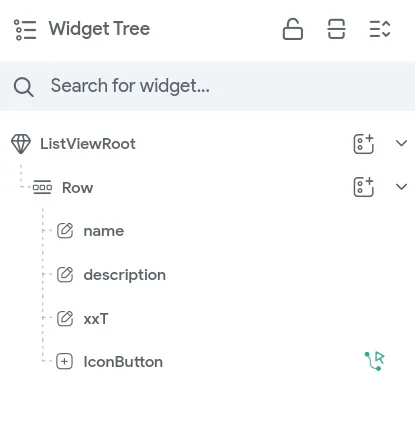
These will stand as below:
I configured "App State Variable" as below.

When testing, everything is fine, but I am facing some issue.
when the clicked the "delete" button on a desired row, the "child-component or the row which contains the delete button I clicked" was not deleted,
and instead of that, the last row (or) the last component inside the ListView disappear.
for example,
Let assume there a 3 row / 3 component inside the ListView as below:
=================
1, B, C ( delete icon )
2, B, C ( delete icon )
3, B, C ( delete icon )
4, B, C ( delete icon )
=================
However I clicked the ANY delete button, the last row (in this time: 4, B, C) is deleted.
when I clicked the ANY delete button, the last row (in this time: 3, B, C) is deleted.
So, how should I do this?
A "save" button has not been added yet, I will add later only after this delete button's action is successful.
Please, please kindly let me get some guidance or knowledge sharing form you all kind experienced seniors how should I successfully solve this problem.
Best regards,
Zaw
I asked AI and searched many knowledge base links described online, and tried in many ways, but those does not work well.
At the current state, I deleted all AppState setting and ListView Settings, component setting, and waiting at zero-configuration state, in order to receive and test the guidance which you will give me soon.